
A craft fair inventory sheet and checklist
Use a craft fair inventory sheet to connect what you pack, what sells and what comes home. Track additions and other removals separately so a stock difference does not silently become a sale.
Count the stock you are taking
Write a product list while packing, rather than rebuilding it at the table. Use names you can match to the item or its tag. Split rows when a size, colour or individual piece needs a separate count.
- Count the quantity you will bring for each product.
- Check that price labels match your event price list.
- Separate display-only samples from stock available to buy.
- Group items by the box or collection you will unpack together.
- Keep a copy of the opening count before you start selling.
For one-of-a-kind work, a short identifier in the name can help: “Blue bowl 04” is easier to distinguish from another blue bowl. A photo is useful when the label alone is hard to recognise. If every piece has its own price, record it separately.
You do not need an elaborate coding system for a table with a handful of products. The point is to find the right row while a customer is waiting.
Copy this craft fair inventory sheet
Use one row per product or distinct piece. Copy the table into a spreadsheet, or print it for a paper count.
| Item / identifier | Packed | Added | Sold | Other out | Sellable returns | Expected left | Counted left | Difference / note |
|---|---|---|---|---|---|---|---|---|
| ________________ | ____ | ____ | ____ | ____ | ____ | ____ | ____ | ____ |
| ________________ | ____ | ____ | ____ | ____ | ____ | ____ | ____ | ____ |
| ________________ | ____ | ____ | ____ | ____ | ____ | ____ | ____ | ____ |
| ________________ | ____ | ____ | ____ | ____ | ____ | ____ | ____ | ____ |
| ________________ | ____ | ____ | ____ | ____ | ____ | ____ | ____ | ____ |
For a compact paper version, use Item / identifier · Packed · Sold · Counted left · Notes, then add columns for other movements when needed.
Example: full catalog and packed stock
Suppose your catalog has 20 pieces. You pack 12 and leave 8 at home. If you sell 3 packed pieces, your packed stock has 9 left and your full catalog has 17, assuming no other movements.
| Catalog total | Packed for fair | Left at home | Sold from packed stock | Packed remainder | Catalog remainder |
|---|---|---|---|---|---|
| 20 | 12 | 8 | 3 | 9 | 17 |
Do not overwrite the catalog total with the packed quantity. Keep the event's packed count separate from your overall product stock.
Record changes while the table is open
Log product quantities when you record a sale. A basket with two Bunnies reduces that product’s count by two even though it is one customer transaction.
Keep other movements visible. Mark a damaged item as damage, a gift as a gift and extra stock brought from home as an addition. A returned piece can be put back into sellable stock only if it is actually available to sell again. Keep any refund in your payment records too.
If you share a table, decide who records the transaction before the rush starts. Two people writing down the same sale can be just as confusing as neither of them doing it.
For products also sold online, check those orders separately. A local paper sheet or an offline app cannot know that another shop sold an item unless that change is entered or a real integration handles it.
Reconcile what comes home
Expected closing stock = opening stock + additions + sellable returns − units sold − other removals
For example, 12 packed pieces, 3 sold and 1 sellable return gives 10 left: 12 − 3 + 1 = 10. This is a stock equation; the refund and money received need their own check.
- Count the actual pieces, including stock stored behind the table.
- Compare the count with your expected closing stock.
- Investigate differences and record the reason for each adjustment.
- Keep the original sales log and save the corrected closing count.
- Write down what needs making or packing for the next event.
Do the count before mixing the remaining items back into your studio stock. Use your sale log and payment totals to check whether a transaction was missed.
Prepare collections and tracked stock in BoothTap
The current BoothTap build supports named collections. A product can be in more than one collection, such as Keychains and Gift Table. In an Event’s item picker, search by name or category, filter to a collection and select the displayed group.
Enable stock tracking on the product and enter the quantity you want the app to track. Recorded sales and corrections update tracked quantities. You can set a low-stock threshold and review stock adjustments.
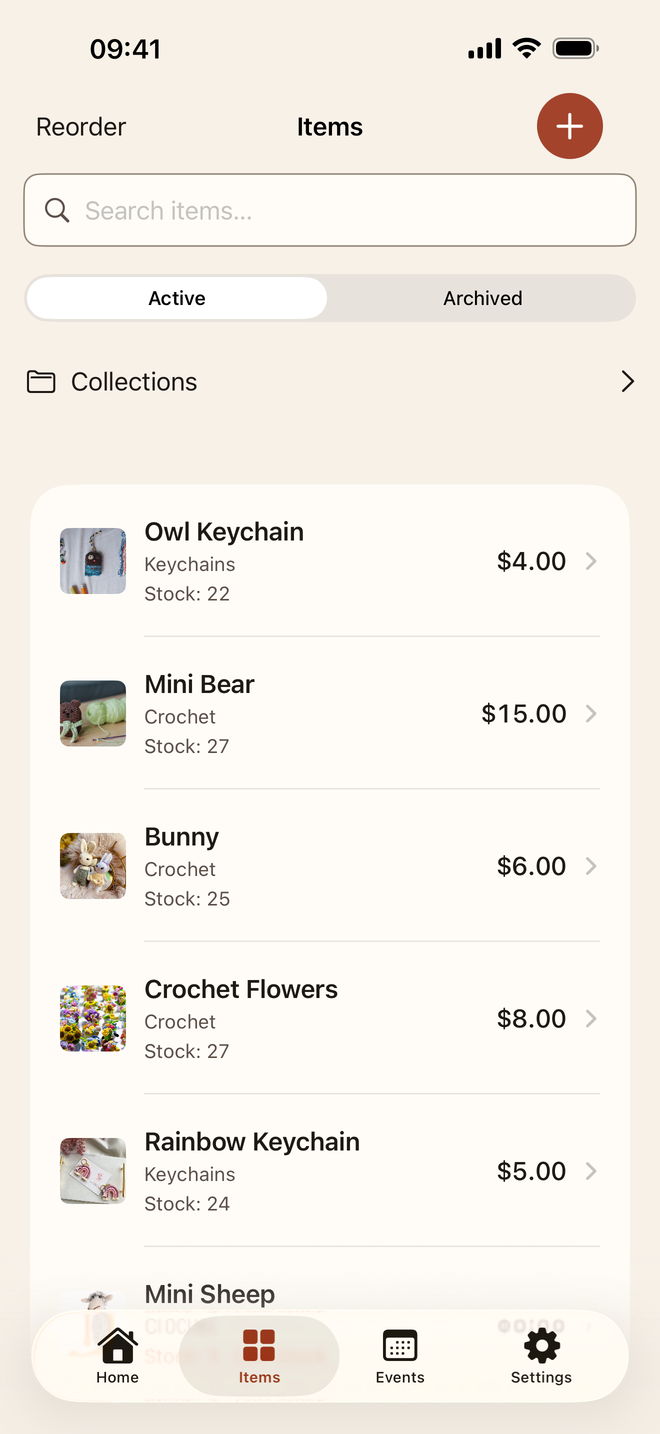
Plan the stock boundary. Product stock is a catalog quantity, not a separate stock allocation for each Event. Selecting a collection for an Event does not reserve those units. BoothTap does not automatically sync stock with Etsy, Square, another online shop or another device.
If some stock stays at home, keep your packed count separately or adjust your tracked quantity deliberately. Save a full backup before making large catalog changes. When you are reviewing the event afterwards, use the profit worksheet to connect the products sold with their costs.
Written by Thunder Lokki from the current BoothTap workflow. Product screens are genuine build 331 captures with public demo data. Examples are illustrative; they are not customer case studies. For a correction or product question, contact BoothTap support.