
How to track sales at a craft fair
Record each customer basket once, with the items, quantities, actual amount paid and payment method. At closing, compare your log with cash, payment-service records and remaining stock.
Copy this craft fair sales log
Write the event, date and currency at the top. Keep opening cash separate. Use one row per customer basket, with quantities beside each item.
| Sale / time | Items and quantities | Units | Basket total | Cash | Card | Other | Note |
|---|---|---|---|---|---|---|---|
| 1 / ____ | ________________ | ____ | ____ | ____ | ____ | ____ | ________ |
| 2 / ____ | ________________ | ____ | ____ | ____ | ____ | ____ | ________ |
| 3 / ____ | ________________ | ____ | ____ | ____ | ____ | ____ | ________ |
For each row, Cash + Card + Other should equal the basket total. Cash means the amount kept after giving change, not the full banknote handed over. If you need to distinguish payment services, add a column for each or name the service in the note.
Use the actual total after discounts. If your records include separately collected tax, add a field and follow your bookkeeping requirements. The examples here have no tax or discount. This is a sale log, not a customer list; names, email addresses and payment-card details are not needed.
Choose a method before customers arrive
| Method | A useful fit | Check before the fair |
|---|---|---|
| Paper tally or notebook | Short product list, repeat prices and a pen within reach | Room for payment amounts, mixed baskets and corrections |
| Spreadsheet | You want your own columns and calculations | Offline access, readable rows and working totals |
| Your payment app | It already records the product and payment detail you need | How cash and payments taken elsewhere will be included |
| Dedicated sales tracker | You want a product catalog and one log for different payment methods | Offline recording, basket review, corrections and export |
If your payment app already gives you a complete usable record, a second detailed log may add work. Choose the authoritative record before you start. For one-of-a-kind pieces, use a recognizable name or identifier on the tag and product list. Count what you pack with the craft fair inventory sheet.
Keep a charger and paper fallback nearby. Rehearse an ordinary sale, a mixed basket and a correction before opening.
Record a basket once
- Find the products and enter their quantities.
- Check the actual total, including any agreed adjustment.
- Take payment through your usual cash, card reader or payment service.
- Record the basket and payment amounts once.
- Check that the sale saved before starting another one.
A basket with three units is one sale, not three. Two payment methods do not create two baskets. Attach a correction to its original sale where possible, or cross-reference it clearly on paper.
When the table gets busy
Use a short fallback note: item identifier, quantity, actual total and payment method. Number it, enter it into your main log when you have a quiet moment, then mark it as entered. That keeps a saved note from becoming a duplicate sale.
If you cannot confidently remember a missing transaction, compare the item count and payment records before entering it. Do not invent a sale just to make a total balance.
Worked example: two sales, four units
These illustrative amounts in USD are separate from the larger demo event in the app screenshot below.
| Sale | Items | Units | Basket total | Cash | Card |
|---|---|---|---|---|---|
| 1 | Owl Keychain × 1 at $4 | 1 | $4 | $4 | $0 |
| 2 | Bunny × 2 at $6; Rainbow Keychain × 1 at $5 | 3 | $17 | $0 | $17 |
| Total | Two customer baskets | 4 | $21 | $4 | $17 |
The second basket is (2 × $6) + $5 = $17. The day has 2 sales, 4 units and $21 recorded.
If the cash box started with $30, expect $34 at closing, assuming no other cash movements. The float is not sales revenue. The card service should show the $17 customer payment; fees or settlement timing can make the later bank payout different.
If the second basket uses split payment
Use $7 cash and $10 card on sale 2. Keep its basket total at $17. The day then totals $11 cash and $10 card, still $21 across two sales. With the same $30 float and no other movements, expected cash is $41. This replaces sale 2's payment split; it is not a third transaction.
Reconcile at closing
Compare individual customer payments in your log with the payment service records before fees. Check settlement statements separately to explain what reached the bank.
Expected cash = opening float + cash kept from sales + other cash added − cash refunds − cash taken out
If cash sales already include refunds as negative amounts, do not subtract them again. Record parking money, extra change and other movements separately. Then count remaining products before mixing them back into studio stock.
| What does not match? | Check first | Avoid this shortcut |
|---|---|---|
| Cash box is short | Opening float, change, cash taken out and payment labels | Adding an unexplained sale or changing the float |
| Bank payout is below card sales | Customer transaction totals, fees and settlement timing | Replacing each sale total with the bank payout |
| Stock is lower than expected | Missed quantities, display stock, gifts, damage and boxes | Assuming every missing piece was sold |
| Sales count looks too high | Duplicate entries, fallback notes and split-payment baskets | Recording the same basket again to fix its method |
Save the checked log and payment records. To estimate what an event earned, use the craft fair profit worksheet to separate product costs, event expenses and missing costs.
Use the same workflow in BoothTap
BoothTap is an offline iPhone sales and inventory tracker. Add products and photos, choose products and prices for an Event, and record a basket with several items. Sale History lets you review transactions; Summary shows recorded value, units and product breakdown.
Leave Quick Sale off when you want to review a basket. When it is on, tapping an item records one unit immediately. Use the immediate Undo action after an accidental tap, then check Sale History.
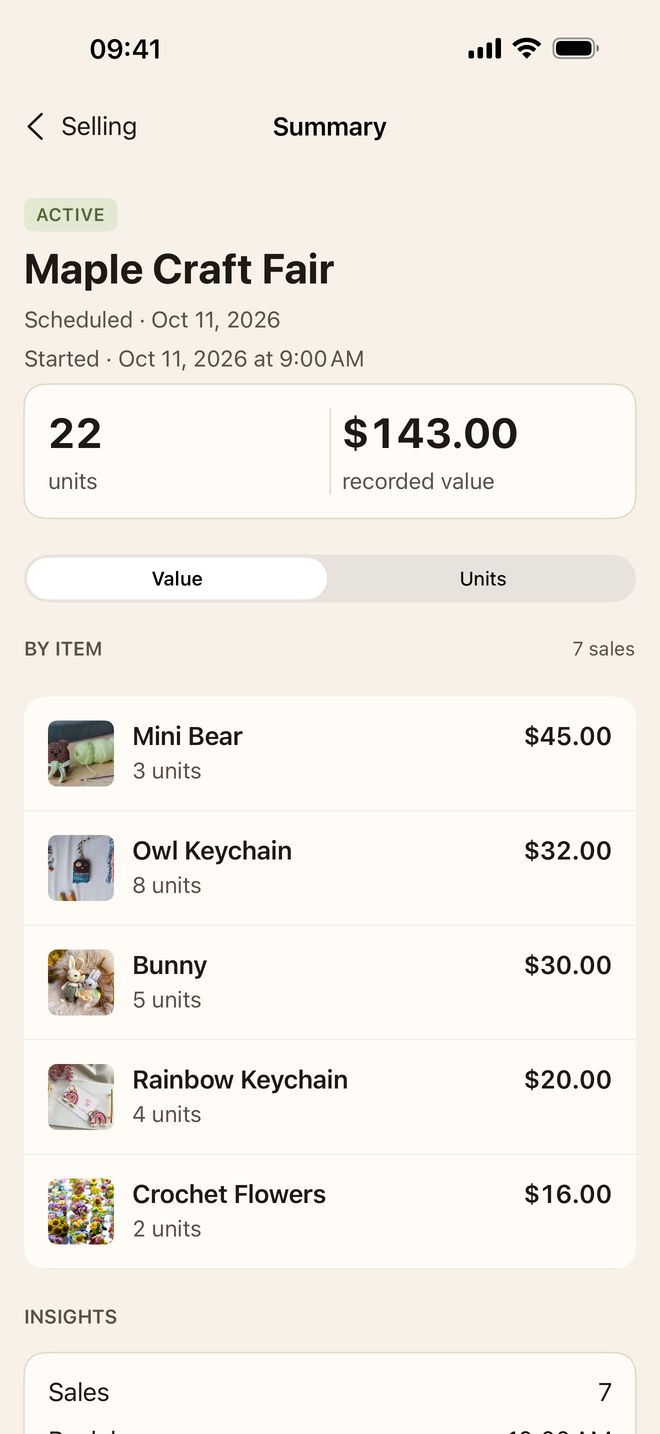
BoothTap records payment details; it does not process payments, move money or sync payment accounts. Keep using your preferred payment service. Product stock belongs to the catalog, so choosing products for an Event does not reserve a separate quantity for that event.
Free includes 100 active products, unlimited Daily and Event sessions, stock tracking, collections, session summaries and CSV export. Full local backup is included: save a backup with photos and app records somewhere you choose. A session CSV does not replace that full backup.
Pro is an optional one-time purchase for unlimited active products, costs, profit estimates, longer-term reports and CSV catalog import. The App Store shows your region's price before purchase.
BoothTap is available on the App Store for iPhone and requires iOS 17 or later. Download BoothTap for iPhone You can also compare Free and Pro features, or use this log with paper or a spreadsheet.
Written by Thunder Lokki, the makers of BoothTap, using the app's released workflow and illustrative examples. For a correction or product question, contact BoothTap support.