
How to calculate profit after a craft fair
To estimate profit after a craft fair, start with sales revenue, subtract the cost of the products sold, then subtract the event expenses you have included. Write down what is still missing, especially your time and unentered costs, before using that number to compare markets.
A craft fair profit worksheet
Use the same currency for every line. Begin with revenue from completed sales, using the actual prices after discounts. Keep collected tax separate from the sales-revenue figure where applicable to your accounting. Your local tax treatment needs its own check.
| Line | What to enter |
|---|---|
| Sales revenue | Actual sales after discounts, with tax handled separately |
| Product costs | Cost per unit × units actually sold |
| Event expenses | Booth fee and the other event costs you choose to include |
| Profit estimate | Sales revenue − product costs − event expenses |
| Missing costs | Anything unknown, excluded or still awaiting a receipt |
A profit worksheet is easiest to trust when the revenue has already been checked against your records. Start with the sales log and reconciliation guide if those totals do not yet agree.
Count the costs of the products you sold
If you brought 20 pieces and sold 6, the product-cost line in this event estimate uses the cost of those 6 pieces. Unsold pieces still matter to your cash flow and inventory; keep their costs in your wider business records rather than charging them again every time you bring them to a market.
Define your unit cost consistently. It might include materials and packaging, or also a labour allocation. Write down your choice so you can compare like with like. Avoid counting packaging or labour again under event expenses if it is already in the unit cost.
Check event expenses individually
- Booth or table fees, including application fees you are counting for that event
- Travel, parking or accommodation
- Payment-processing fees from the service you actually used
- Event-specific rentals or supplies
- Helper pay or your own time, if you choose to include them
Use your actual receipts and statements. A rule such as “three times the booth fee” cannot tell you what this particular event cost. Keep equipment used across many fairs separate or allocate its cost consistently.
A worked example: $143 in sales
The app screenshot below uses a public demo dataset, with dollars as its selling currency. These figures are illustrative and are not reported customer earnings.
| Line | Amount |
|---|---|
| Sales revenue | $143.00 |
| Product costs | − $39.30 |
| Event expenses | − $20.00 |
| Profit estimate | $83.70 |
The arithmetic is $143.00 − $39.30 − $20.00 = $83.70. That estimate includes only the costs entered. If you later find a $4.50 payment-service fee that was not included, the estimate becomes $79.20.
It is also not a measure of how well you were paid for your time unless you have included that time. You can note total preparation, travel and selling hours alongside the estimate to compare the effort involved. This worksheet is an event-planning aid, not a tax return or a full accounting system.
Keep missing costs visible
An unknown unit cost should stay unknown until you have a reasonable value. Entering zero just to clear an incomplete warning makes the estimate look more certain than it is.
Check whether every sold product has a cost, whether all event expenses have been entered and whether a discount or corrected sale changed revenue. Keep a short note such as “packaging and making time excluded” with your worksheet when you cannot finish it yet.
A market with a higher estimate may simply have fewer costs entered. Fill the gaps or label the comparison as incomplete before deciding which event to book again.
Compare fairs on the same basis
Use the same cost definition and a single currency when comparing events. Check the stock count so a missed sale does not distort the result.
Record the hours spent, the products you brought and whether key items sold out. A strong result from a short local market is a different commitment from the same result across a weekend away. Keep your notes factual: date, hours, costs included and what you would change next time.
You do not need a forecast of future customer orders to compare recorded event results. If later online orders might be related to a fair, track them separately and avoid assigning every later purchase to that event without evidence.
Read the estimate in BoothTap Pro
The current BoothTap build adds product unit costs and event expenses to its Pro reports. Profit estimates subtract known product costs and entered expenses from recorded revenue. Missing product costs are flagged, so an incomplete estimate remains visible.
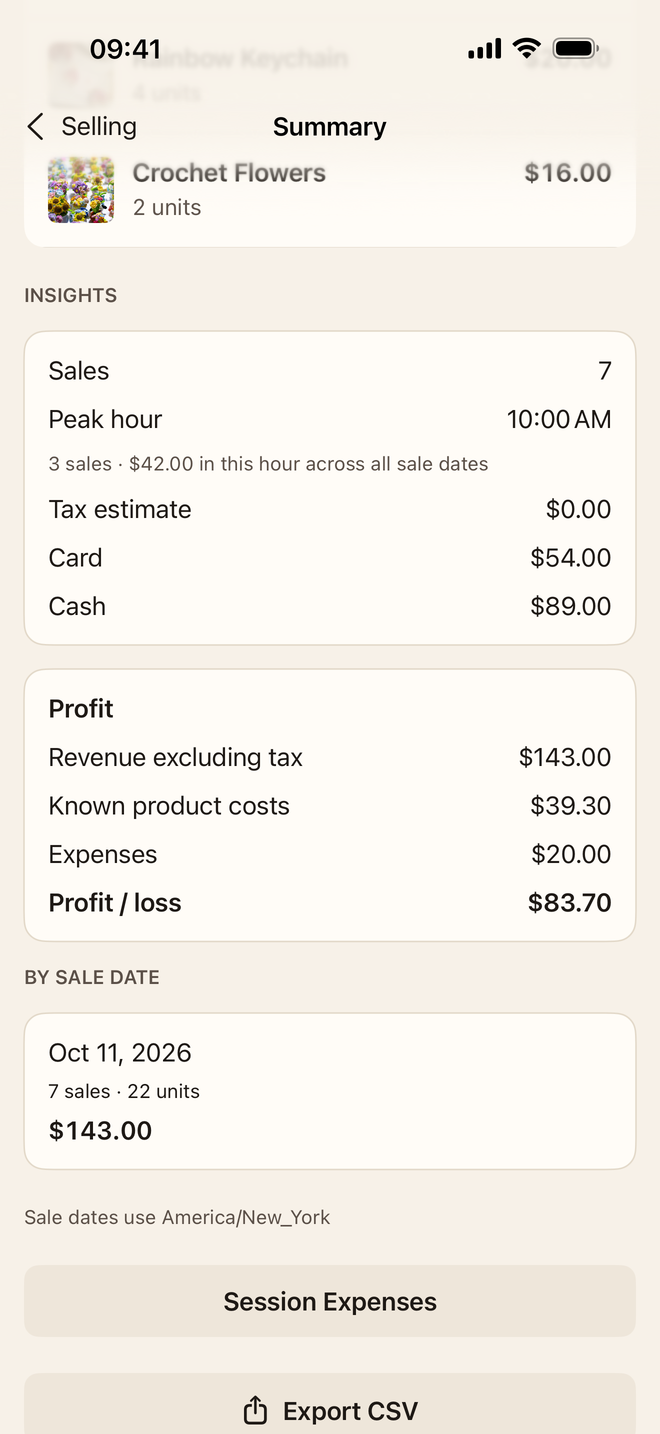
Business Insights brings together reports across sessions. The result still depends on the records you enter; BoothTap does not automatically fetch your bank transactions, payment fees or online-shop costs. Free includes session summaries and CSV export if you prefer to keep your cost worksheet elsewhere.
See the Free and Pro feature list before choosing which workflow suits you.
Written by Thunder Lokki from the current BoothTap workflow. Product screens are genuine build 331 captures with public demo data. Examples are illustrative; they are not customer case studies. For a correction or product question, contact BoothTap support.